Your Complete Solution for Professional Book Cover Design
You've spent weeks, maybe months, crafting the interior of your book. It’s a planner filled with useful prompts, a journal with thoughtful layouts, or a notebook designed for a specific audience. The content is ready, but the cover feels like a daunting final hurdle. You know it needs to look professional to attract readers on Amazon KDP, but you're not a graphic designer, and hiring one seems costly and time-consuming. This is the exact moment where a resource like the 15 Book Cover Templates Bundle Editable becomes not just a tool, but a practical partner in your publishing journey.
What This Bundle Actually Does for You
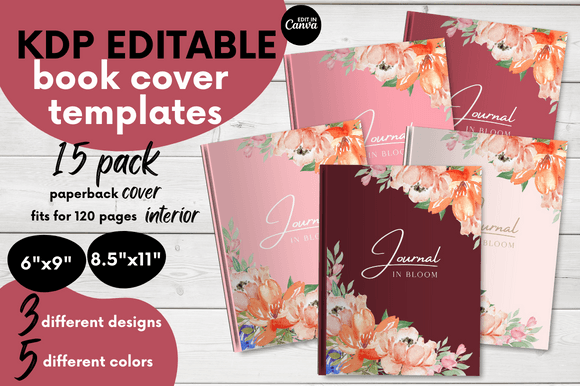
Think of it as a pre-built, customizable shell for your book. Instead of starting from a blank canvas in a design program, you start from a polished, professional foundation. The bundle provides 15 distinct templates, which essentially means three core design styles offered in five different color palettes. This variety is crucial because a sleek, minimalist design might suit a productivity planner, while a softer, colorful palette could better attract buyers for a mindfulness journal. They come formatted for the two most common paperback sizes: 6×9 inches and 8.5×11 inches, complete with bleed settings so your final printed cover looks flawless. The templates are built in Canva, a platform many creators are already familiar with, which means you don't need to learn complex new software. You can change the text, adjust colors slightly, add your title, and be ready to publish.
The Real-World Situations Where This Template Bundle Shines
Consider the freelance writer who decides to expand their income by publishing a series of niche journals on Amazon KDP. They have the writing skills and understand their audience, but graphic design is outside their wheelhouse. Using the 15 Book Cover Templates Bundle Editable, they can quickly produce a cohesive series of covers that look like they belong together, establishing brand recognition without needing to study design principles for months.
Or imagine a small business owner creating custom workbooks or planners as complementary products for their clients. They need these materials to reflect the professionalism of their main business. By selecting a template from the bundle that aligns with their existing brand colors and feel, they can produce a high-quality cover that reinforces their business identity, all while saving the budget that would have gone to a designer.
Even for a hobbyist or educator creating a personal project—like a family recipe book or a workshop guide—the need for a clean, attractive presentation is real. This bundle removes the anxiety of "making it look good." It allows the creator to focus entirely on the content inside, knowing the exterior will be handled by a tested, formatted design.
Connecting Features to Tangible Outcomes
The listing mentions specs like bleed and fit for 120-page interiors. These aren't just technical jargon; they translate directly into real outcomes. Proper bleed ensures your cover doesn't have awkward white edges when printed, a common rookie mistake that makes a book look amateurish. The fit for a 120-page interior means the spine width calculation is already considered in the template design. When you input your final page count, the spine adjusts correctly. This prevents the frustrating scenario of a beautiful cover design being ruined by a spine that’s too wide or too narrow because you had to guess the math.
The provision of both 6×9 and 8.5×11 sizes addresses a practical choice every publisher faces. The 6×9 size is a standard, comfortable novel or journal size. The 8.5×11 is often preferred for workbooks, planners, or educational materials where more writing space per page is needed. Having templates for both means you aren't locked into one format; you can choose the best size for your content and have a ready-made cover solution.
What You Should Consider Before Using These Templates
While the bundle is incredibly versatile, it’s important to align it with your own needs. First, remember it’s a cover template only. Your interior pages are a separate project. You’ll need to have those ready, either created yourself or purchased from another source. Second, you’ll need access to Canva. The free version works, but the Pro version offers more flexibility with certain elements. This is a key practical consideration: ensure you’re comfortable working within the Canva environment.
Also, think about your own customization level. The templates are designed to be changed—you can alter text, fonts, and colors. However, the underlying layouts are fixed. If you have a vision for a cover that requires a radically different compositional structure (like a full-page photographic background or an unconventional text placement), a pre-made template might feel restrictive. For most standard books, journals, and planners, however, the provided layouts are more than sufficient.
Finally, consider the color variations. The five colors per design aren't just aesthetic; they serve different markets. A dark, sophisticated palette might target a corporate or academic audience. Bright, vibrant colors could appeal to a younger demographic or a creative hobby market. Look at your target reader and choose the palette that visually speaks to them.
Beyond Journals and Planners: Wider Applications
The obvious use is for KDP books, but the utility extends further. Entrepreneurs might use these designs for internal company manuals or client presentation binders that need a polished look. Bloggers creating downloadable PDF resources for their audience could use a template to give that PDF a cover page that feels like a real book, enhancing its perceived value. Coaches and course creators often produce supplemental workbooks; a professional cover makes that workbook feel part of a premium offering.
The commercial and personal use license is a significant benefit. It means if you create a book for sale, you’re covered. If you create a personal gift, like a compiled memoir for a family member, you’re also covered. The only restriction is against reselling the template files themselves—a common and fair stipulation that protects the designer's work.
The instant digital download model is perfect for the fast-paced world of self-publishing. You can get the files immediately after purchase, use them for your current project, and archive them for future use. They don’t expire, so as your publishing efforts grow—perhaps into a series or different genres—you can return to the same bundle and pull out a different template, ensuring consistency in your workflow and savings over time.
A Tool for Focus, Not Just Design
Ultimately, the value of the 15 Book Cover Templates Bundle Editable lies in what it lets you avoid: the distraction, time sink, and uncertainty of cover design. For a creator, your primary asset is your content and your time. This bundle protects that time. It provides a clear, proven path from finished interior to market-ready exterior. It turns the final, often stressful, step of publishing into a straightforward, editable task. You’re not starting from zero; you’re starting from a point of professional confidence. That shift in mindset—from "how will I ever design this?" to "which of these great options fits my book best?"—is perhaps its most practical benefit of all.